> ## Documentation Index
> Fetch the complete documentation index at: https://docs.unify.ai/llms.txt
> Use this file to discover all available pages before exploring further.
# Linked desktop internals
> How remote control of the user's own machine actually works — a code-level tour of the open-source runtime
Everything else in this section describes the linked desktop as a user
experiences it. This page is for developers: how the open-source
[`unifyai/unify`](https://github.com/unifyai/unify) runtime models, controls,
and gates access to a **user's own machine** — as opposed to the assistant's
managed VM. The closed-source pieces (the Console linker UI, the tunnel
relay, and the desktop client app itself) appear here only as opaque
endpoints; every symbol referenced below is in the public repo.
The mental model to hold onto: the runtime knows about **three machines**,
each with its own primitives namespace and execution surface:
| Machine | Primitives namespace | Execution surface | Transport |
| ------------------------- | -------------------------------------- | ------------------- | ------------------------------------------------------------------------------------------ |
| The runtime host itself | — (local `execute_code`) | `local` | in-process |
| Assistant's managed VM | `primitives.computer.desktop` / `.web` | `assistant_desktop` | agent-service at `SESSION_DETAILS.assistant.desktop_url`, plus continuous workspace bisync |
| **User's linked machine** | `primitives.computer.user_desktop` | `user_desktop` | agent-service at the link's tunnel URL, plus **on-demand** SFTP |
The user's machine is deliberately the odd one out: it is never shown in the
Console live view, every call re-checks consent, file access is
pull-on-request rather than continuously synced, and writebacks never touch
originals.
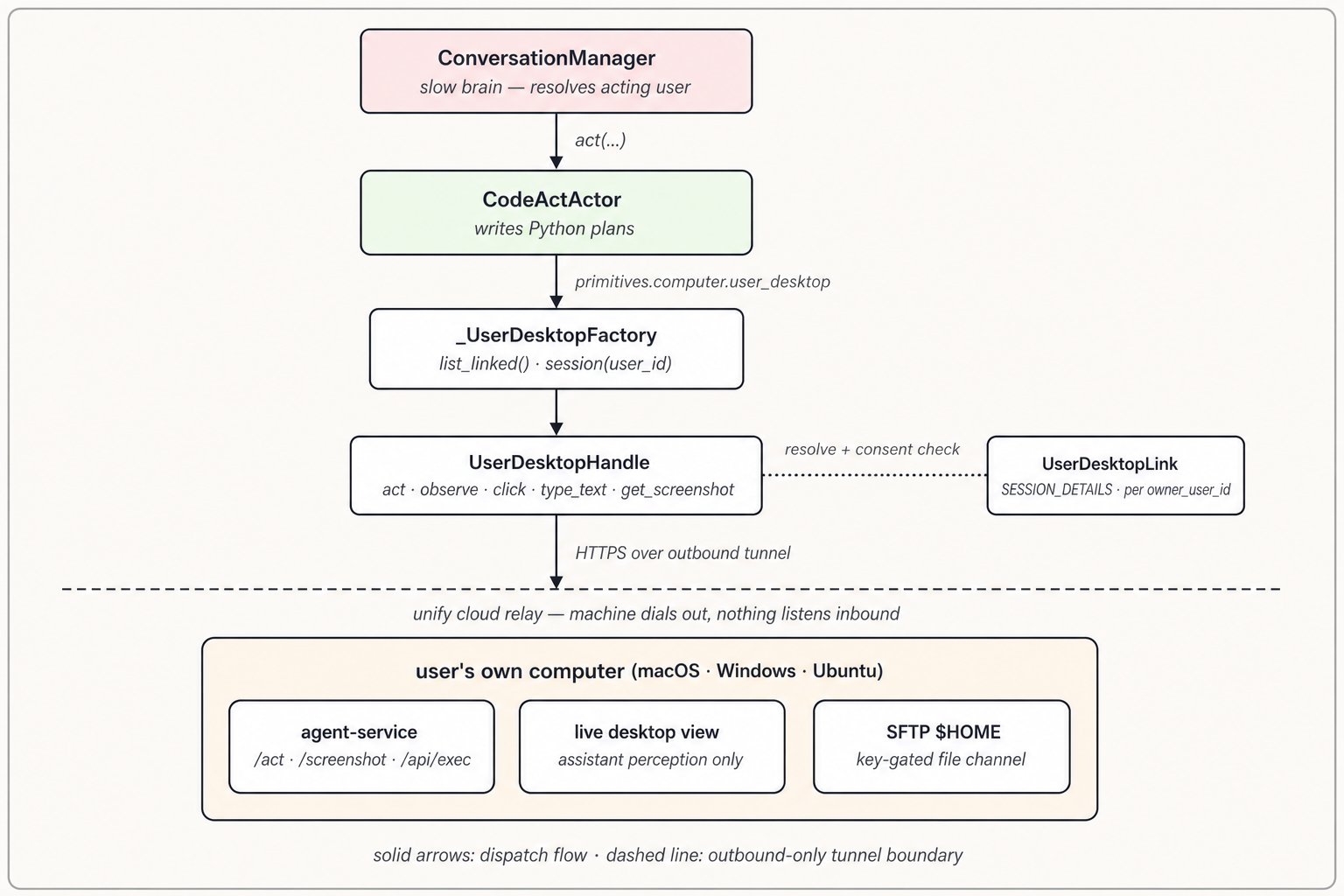 ## The link: session state
The unit of state is `UserDesktopLink` in
[`unify/session_details.py`](https://github.com/unifyai/unify/blob/main/unify/session_details.py):
| Field | Semantics |
| --------------------------------------- | ---------------------------------------------------------------------------------------- |
| `owner_user_id` | The user who owns the machine — and the key of the link map |
| `url` | Reverse-tunnel URL of the device's agent-service (screen + exec control) |
| `os` | `"ubuntu"`, `"windows"`, or `"macos"` |
| `filesys_sync` | Standing Console consent for home-filesystem access |
| `sftp_tunnel_host` / `sftp_tunnel_port` | Raw-TCP SFTP tunnel coordinates, present once the device has registered its file channel |
| `filesys_available` (property) | `filesys_sync` **and** both tunnel coordinates — "consented *and* actually reachable" |
Links live on the session as `AssistantDetails.user_desktops`, a
`dict[str, UserDesktopLink]` keyed by owner, with
`AssistantDetails.user_desktop_for(user_id)` as the lookup. The docstring
carries the important design point:
> A shared assistant can be linked to a different desktop per user, so links
> are keyed by `owner_user_id` and resolved at runtime against whoever is
> currently interacting with the assistant.
That's the multi-user story in one line: for a shared assistant, the
ConversationManager resolves an **acting user** each turn (the message
sender when it maps to a provisioned system user, else the workspace owner)
and desktop targeting follows the *speaker's* link, not the owner's.
Three mechanics worth knowing:
* **Wire → session.** Links arrive as a `user_desktops` list on
`StartupEvent` and `AssistantUpdateEvent`
([`unify/conversation_manager/events.py`](https://github.com/unifyai/unify/blob/main/unify/conversation_manager/events.py)),
applied via `SessionDetails.populate` and normalized by
`normalize_user_desktops`. The gateway includes the field when building
assistant payloads in
[`unify/gateway/adapters/common.py`](https://github.com/unifyai/unify/blob/main/unify/gateway/adapters/common.py).
Link/unlink churn is just an `AssistantUpdateEvent` refresh — there is no
dedicated "desktop linked" event.
* **Subprocess propagation.** `SessionDetails.export_to_env` round-trips the
map through the `ASSISTANT_USER_DESKTOPS` env var
(`_encode_user_desktops` / `_decode_user_desktops`) so actor subprocesses
see the same links.
* **No keys on the link.** SFTP private keys never ride `UserDesktopLink`;
they're fetched on demand from an admin-only field (see the files section
below).
## The control surface: `primitives.computer.user_desktop`
The namespace is built in
[`unify/function_manager/primitives/runtime.py`](https://github.com/unifyai/unify/blob/main/unify/function_manager/primitives/runtime.py)
around three types:
* **`_UserDesktopFactory`** — the object bound at
`primitives.computer.user_desktop`. Two synchronous entry points:
`list_linked()` returns one dict per linked machine (`user_id`, `os`,
`filesys_sync`, `filesys_available`), and `session(user_id=None)` returns
a handle. Resolution (`_resolve_user_desktop_link`) defaults to the
session's primary user, falls back to the sole link when exactly one
exists, and raises when several users have linked desktops and no
`user_id` was given — ambiguity is an error, not a guess.
* **`UserDesktopHandle`** — the per-user control handle. Its method set is
`_DESKTOP_METHODS`: the full computer vocabulary (`act`, `observe`,
`query`, `navigate`, `get_links`, `get_screenshot`, plus low-level input
like `click`, `type_text`, `press_key`, `scroll`, `drag`,
`execute_actions`) **minus** `get_content` and `solve_captcha`. All
methods are async; `user_id`, `os`, and `label` are properties.
* **`ComputerPrimitives`** — the owner that holds caches and consent state
(below).
Routing is thin by design. Each handle method resolves the link, asserts
consent, then obtains a backend session:
* The backend is the same `MagnitudeBackend` /
`ComputerSession` HTTP client used for the assistant's VM
([`unify/function_manager/computer_backends.py`](https://github.com/unifyai/unify/blob/main/unify/function_manager/computer_backends.py)),
pointed at `{scheme}://{netloc}/api` parsed from `UserDesktopLink.url` —
i.e. the device's agent-service reached through its outbound tunnel.
Requests authenticate with `Bearer SESSION_DETAILS.unify_key`, which the
device verifies against the platform before acting.
* Backends are cached per tunnel URL in
`ComputerPrimitives._user_desktop_backends` — separate from the assistant
VM's singleton backend.
Three deliberate differences from the assistant-desktop path:
1. **No VM-readiness gate.** Assistant desktop calls wait on the managed
VM being ready; user-desktop calls don't — the machine either answers
through its tunnel or errors.
2. **Consent is re-checked per call**, not per session
(`_assert_user_desktop_allowed`) — a mid-session revocation fails the
very next method call with `PermissionError`, whose message is the
constant `_USER_DESKTOP_REVOKED_MSG`: stop immediately, don't retry.
3. **Failure clears caches.** Terminal transport errors route through
`_handle_user_desktop_error`, which drops the cached backend and SFTP
clients so the next attempt reconnects cleanly.
## The file channel: `user_desktop.files`
## The link: session state
The unit of state is `UserDesktopLink` in
[`unify/session_details.py`](https://github.com/unifyai/unify/blob/main/unify/session_details.py):
| Field | Semantics |
| --------------------------------------- | ---------------------------------------------------------------------------------------- |
| `owner_user_id` | The user who owns the machine — and the key of the link map |
| `url` | Reverse-tunnel URL of the device's agent-service (screen + exec control) |
| `os` | `"ubuntu"`, `"windows"`, or `"macos"` |
| `filesys_sync` | Standing Console consent for home-filesystem access |
| `sftp_tunnel_host` / `sftp_tunnel_port` | Raw-TCP SFTP tunnel coordinates, present once the device has registered its file channel |
| `filesys_available` (property) | `filesys_sync` **and** both tunnel coordinates — "consented *and* actually reachable" |
Links live on the session as `AssistantDetails.user_desktops`, a
`dict[str, UserDesktopLink]` keyed by owner, with
`AssistantDetails.user_desktop_for(user_id)` as the lookup. The docstring
carries the important design point:
> A shared assistant can be linked to a different desktop per user, so links
> are keyed by `owner_user_id` and resolved at runtime against whoever is
> currently interacting with the assistant.
That's the multi-user story in one line: for a shared assistant, the
ConversationManager resolves an **acting user** each turn (the message
sender when it maps to a provisioned system user, else the workspace owner)
and desktop targeting follows the *speaker's* link, not the owner's.
Three mechanics worth knowing:
* **Wire → session.** Links arrive as a `user_desktops` list on
`StartupEvent` and `AssistantUpdateEvent`
([`unify/conversation_manager/events.py`](https://github.com/unifyai/unify/blob/main/unify/conversation_manager/events.py)),
applied via `SessionDetails.populate` and normalized by
`normalize_user_desktops`. The gateway includes the field when building
assistant payloads in
[`unify/gateway/adapters/common.py`](https://github.com/unifyai/unify/blob/main/unify/gateway/adapters/common.py).
Link/unlink churn is just an `AssistantUpdateEvent` refresh — there is no
dedicated "desktop linked" event.
* **Subprocess propagation.** `SessionDetails.export_to_env` round-trips the
map through the `ASSISTANT_USER_DESKTOPS` env var
(`_encode_user_desktops` / `_decode_user_desktops`) so actor subprocesses
see the same links.
* **No keys on the link.** SFTP private keys never ride `UserDesktopLink`;
they're fetched on demand from an admin-only field (see the files section
below).
## The control surface: `primitives.computer.user_desktop`
The namespace is built in
[`unify/function_manager/primitives/runtime.py`](https://github.com/unifyai/unify/blob/main/unify/function_manager/primitives/runtime.py)
around three types:
* **`_UserDesktopFactory`** — the object bound at
`primitives.computer.user_desktop`. Two synchronous entry points:
`list_linked()` returns one dict per linked machine (`user_id`, `os`,
`filesys_sync`, `filesys_available`), and `session(user_id=None)` returns
a handle. Resolution (`_resolve_user_desktop_link`) defaults to the
session's primary user, falls back to the sole link when exactly one
exists, and raises when several users have linked desktops and no
`user_id` was given — ambiguity is an error, not a guess.
* **`UserDesktopHandle`** — the per-user control handle. Its method set is
`_DESKTOP_METHODS`: the full computer vocabulary (`act`, `observe`,
`query`, `navigate`, `get_links`, `get_screenshot`, plus low-level input
like `click`, `type_text`, `press_key`, `scroll`, `drag`,
`execute_actions`) **minus** `get_content` and `solve_captcha`. All
methods are async; `user_id`, `os`, and `label` are properties.
* **`ComputerPrimitives`** — the owner that holds caches and consent state
(below).
Routing is thin by design. Each handle method resolves the link, asserts
consent, then obtains a backend session:
* The backend is the same `MagnitudeBackend` /
`ComputerSession` HTTP client used for the assistant's VM
([`unify/function_manager/computer_backends.py`](https://github.com/unifyai/unify/blob/main/unify/function_manager/computer_backends.py)),
pointed at `{scheme}://{netloc}/api` parsed from `UserDesktopLink.url` —
i.e. the device's agent-service reached through its outbound tunnel.
Requests authenticate with `Bearer SESSION_DETAILS.unify_key`, which the
device verifies against the platform before acting.
* Backends are cached per tunnel URL in
`ComputerPrimitives._user_desktop_backends` — separate from the assistant
VM's singleton backend.
Three deliberate differences from the assistant-desktop path:
1. **No VM-readiness gate.** Assistant desktop calls wait on the managed
VM being ready; user-desktop calls don't — the machine either answers
through its tunnel or errors.
2. **Consent is re-checked per call**, not per session
(`_assert_user_desktop_allowed`) — a mid-session revocation fails the
very next method call with `PermissionError`, whose message is the
constant `_USER_DESKTOP_REVOKED_MSG`: stop immediately, don't retry.
3. **Failure clears caches.** Terminal transport errors route through
`_handle_user_desktop_error`, which drops the cached backend and SFTP
clients so the next attempt reconnects cleanly.
## The file channel: `user_desktop.files`
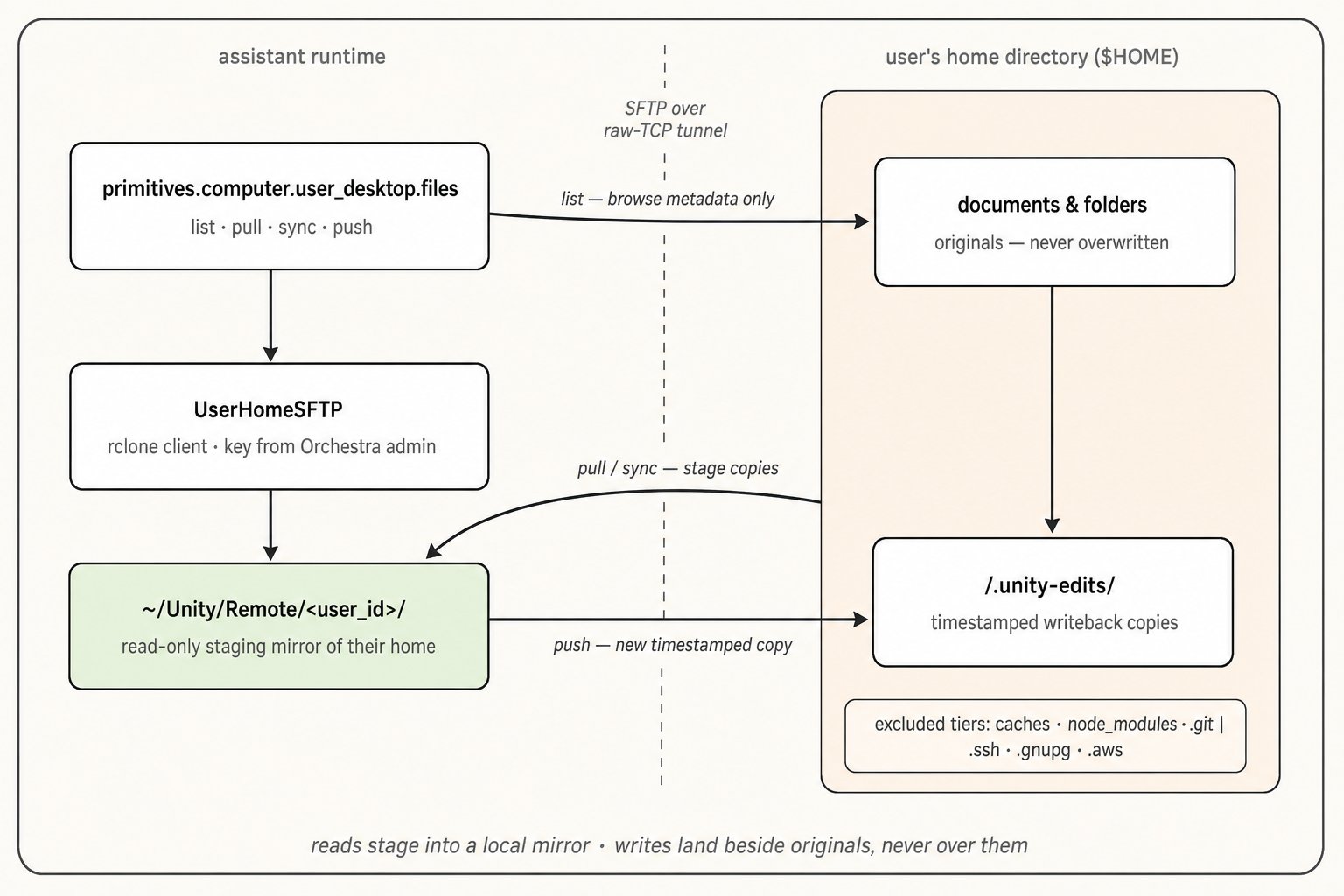 File access is a **separate channel with separate consent**, implemented in
[`unify/file_manager/sync/user_sftp.py`](https://github.com/unifyai/unify/blob/main/unify/file_manager/sync/user_sftp.py)
and exposed through `_UserDesktopFilesNamespace` (in
[`runtime.py`](https://github.com/unifyai/unify/blob/main/unify/function_manager/primitives/runtime.py))
as four async methods:
| Method | Contract |
| -------------------------------------------- | ---------------------------------------------------------------------------------------------------- |
| `files.list(path, user_id)` | Browse a home-relative directory — metadata only, nothing copied |
| `files.pull(path, user_id)` | Fetch one file into the local staging mirror |
| `files.sync(path, user_id)` | Bulk-mirror a subtree (`""` = entire home — discouraged; `list` + `pull` is the canonical lazy path) |
| `files.push(local_path, dest_path, user_id)` | Write content back **as a timestamped copy** — never over the original |
`UserHomeSFTP` is the transport: an on-demand rclone SFTP client, one per
user, connecting as the fixed user `SFTP_USER = "unity"` to the link's
`sftp_tunnel_host:port`, serving the user's `$HOME` as its root. Its
`setup()` fetches the per-link private key, writes it plus a temporary
rclone config, and connection-tests before first use. Key custody is the
notable design decision, straight from the module docstring: the private
key lives server-side in an admin/runtime-only map
(`user_desktop_filesync_keys`, keyed by `owner_user_id`) and is fetched by
`_get_private_key()` at setup time — *"so it never rides"* the link payload
that circulates through session state.
Three properties make this channel safe to expose to an autonomous agent:
* **A read-only mirror, not a live mount.** Reads stage into
`~/Unity/Remote//` (the `local_root` property), mirroring the
remote tree. The actor's filesystem-context prompt
(`_build_filesystem_context` in
[`unify/actor/prompt_builders.py`](https://github.com/unifyai/unify/blob/main/unify/actor/prompt_builders.py))
names this mirror, and `LocalFileSystemAdapter`
([`unify/file_manager/filesystem_adapters/local_adapter.py`](https://github.com/unifyai/unify/blob/main/unify/file_manager/filesystem_adapters/local_adapter.py))
accepts absolute paths, so staged files flow through the normal
`primitives.files.*` machinery without special-casing.
* **Writebacks are versioned copies.** `push` computes a remote path under
`EDITS_DIR = ".unity-edits"` mirroring the destination's parent, with a
`_utc_stamp()` suffix in the filename. Originals are structurally
unreachable by the write path — the guarantee the Console copy makes
("your originals are never overwritten") is enforced here, not by
convention.
* **Tiered excludes.** `_build_excludes` composes three tiers:
`_ALWAYS_EXCLUDES` (the `.unity-edits` tree itself), `_NOISE_EXCLUDES`
(caches, `node_modules`, `.git`, platform junk), and `_SECRET_EXCLUDES`
(`.ssh`, `.gnupg`, `.aws`, credential stores). `list_dir` applies only
tier 1 — browsing stays truthful — while `pull`/`sync` apply all three,
so credential material never lands in the mirror.
Every file operation also publishes a `UserDesktopFileAccess` audit event
(payload model in
[`unify/events/types/desktop_primitive.py`](https://github.com/unifyai/unify/blob/main/unify/events/types/desktop_primitive.py)).
## Shell and Python: the `user_desktop` execution surface
Command execution rides the actor's execution-surface abstraction rather
than the primitives handle:
* [`unify/actor/execution/surface.py`](https://github.com/unifyai/unify/blob/main/unify/actor/execution/surface.py)
defines `ExecutionSurface` (`LOCAL`, `ASSISTANT_DESKTOP`,
`USER_DESKTOP`) and `SurfaceCapabilities`.
`_user_desktop_capabilities` grants `can_python` and `can_shell` when the
link has a `url`, and `can_files` only when `filesys_available`.
* The actor's `execute_code` tool
([`unify/actor/code_act_actor.py`](https://github.com/unifyai/unify/blob/main/unify/actor/code_act_actor.py))
takes `surface="user_desktop"` plus an optional `user_id`, resolved
through `get_target(...)` in
[`unify/actor/execution/targets/factory.py`](https://github.com/unifyai/unify/blob/main/unify/actor/execution/targets/factory.py).
Remote surfaces are **stateless-only** — no persistent sessions or
venvs, unlike local execution.
* [`UserDesktopTarget`](https://github.com/unifyai/unify/blob/main/unify/actor/execution/targets/user_desktop.py)
does the work: `run_shell` and `run_python` POST to the device
agent-service's `/api/exec` via `AgentServiceExecClient`
([`exec_client.py`](https://github.com/unifyai/unify/blob/main/unify/actor/execution/targets/exec_client.py)),
with Python inlined through the same `_inline_python_command` helper the
assistant-desktop target uses. `put_file` / `get_file` route through
`UserHomeSFTP.push` / `pull` — file movement always goes through the
guarded channel, never through shell redirection.
The prompt layer enforces a matching policy split: shell on
`surface="user_desktop"` is **only** for commands the user explicitly wants
run on their machine. Retrieving file *content* by shelling out —
`cat`/`find`/`tar`/`base64`/`cp`/`scp`/`rclone` — is expressly forbidden;
the actor is steered to `user_desktop.files`, which is where the
no-overwrite and exclusion guarantees live. That rule appears both in the
actor prompt
([`unify/actor/prompt_builders.py`](https://github.com/unifyai/unify/blob/main/unify/actor/prompt_builders.py))
and the computer environment context
([`unify/actor/environments/computer.py`](https://github.com/unifyai/unify/blob/main/unify/actor/environments/computer.py)).
## Consent: three gates, checked at three times
File access is a **separate channel with separate consent**, implemented in
[`unify/file_manager/sync/user_sftp.py`](https://github.com/unifyai/unify/blob/main/unify/file_manager/sync/user_sftp.py)
and exposed through `_UserDesktopFilesNamespace` (in
[`runtime.py`](https://github.com/unifyai/unify/blob/main/unify/function_manager/primitives/runtime.py))
as four async methods:
| Method | Contract |
| -------------------------------------------- | ---------------------------------------------------------------------------------------------------- |
| `files.list(path, user_id)` | Browse a home-relative directory — metadata only, nothing copied |
| `files.pull(path, user_id)` | Fetch one file into the local staging mirror |
| `files.sync(path, user_id)` | Bulk-mirror a subtree (`""` = entire home — discouraged; `list` + `pull` is the canonical lazy path) |
| `files.push(local_path, dest_path, user_id)` | Write content back **as a timestamped copy** — never over the original |
`UserHomeSFTP` is the transport: an on-demand rclone SFTP client, one per
user, connecting as the fixed user `SFTP_USER = "unity"` to the link's
`sftp_tunnel_host:port`, serving the user's `$HOME` as its root. Its
`setup()` fetches the per-link private key, writes it plus a temporary
rclone config, and connection-tests before first use. Key custody is the
notable design decision, straight from the module docstring: the private
key lives server-side in an admin/runtime-only map
(`user_desktop_filesync_keys`, keyed by `owner_user_id`) and is fetched by
`_get_private_key()` at setup time — *"so it never rides"* the link payload
that circulates through session state.
Three properties make this channel safe to expose to an autonomous agent:
* **A read-only mirror, not a live mount.** Reads stage into
`~/Unity/Remote//` (the `local_root` property), mirroring the
remote tree. The actor's filesystem-context prompt
(`_build_filesystem_context` in
[`unify/actor/prompt_builders.py`](https://github.com/unifyai/unify/blob/main/unify/actor/prompt_builders.py))
names this mirror, and `LocalFileSystemAdapter`
([`unify/file_manager/filesystem_adapters/local_adapter.py`](https://github.com/unifyai/unify/blob/main/unify/file_manager/filesystem_adapters/local_adapter.py))
accepts absolute paths, so staged files flow through the normal
`primitives.files.*` machinery without special-casing.
* **Writebacks are versioned copies.** `push` computes a remote path under
`EDITS_DIR = ".unity-edits"` mirroring the destination's parent, with a
`_utc_stamp()` suffix in the filename. Originals are structurally
unreachable by the write path — the guarantee the Console copy makes
("your originals are never overwritten") is enforced here, not by
convention.
* **Tiered excludes.** `_build_excludes` composes three tiers:
`_ALWAYS_EXCLUDES` (the `.unity-edits` tree itself), `_NOISE_EXCLUDES`
(caches, `node_modules`, `.git`, platform junk), and `_SECRET_EXCLUDES`
(`.ssh`, `.gnupg`, `.aws`, credential stores). `list_dir` applies only
tier 1 — browsing stays truthful — while `pull`/`sync` apply all three,
so credential material never lands in the mirror.
Every file operation also publishes a `UserDesktopFileAccess` audit event
(payload model in
[`unify/events/types/desktop_primitive.py`](https://github.com/unifyai/unify/blob/main/unify/events/types/desktop_primitive.py)).
## Shell and Python: the `user_desktop` execution surface
Command execution rides the actor's execution-surface abstraction rather
than the primitives handle:
* [`unify/actor/execution/surface.py`](https://github.com/unifyai/unify/blob/main/unify/actor/execution/surface.py)
defines `ExecutionSurface` (`LOCAL`, `ASSISTANT_DESKTOP`,
`USER_DESKTOP`) and `SurfaceCapabilities`.
`_user_desktop_capabilities` grants `can_python` and `can_shell` when the
link has a `url`, and `can_files` only when `filesys_available`.
* The actor's `execute_code` tool
([`unify/actor/code_act_actor.py`](https://github.com/unifyai/unify/blob/main/unify/actor/code_act_actor.py))
takes `surface="user_desktop"` plus an optional `user_id`, resolved
through `get_target(...)` in
[`unify/actor/execution/targets/factory.py`](https://github.com/unifyai/unify/blob/main/unify/actor/execution/targets/factory.py).
Remote surfaces are **stateless-only** — no persistent sessions or
venvs, unlike local execution.
* [`UserDesktopTarget`](https://github.com/unifyai/unify/blob/main/unify/actor/execution/targets/user_desktop.py)
does the work: `run_shell` and `run_python` POST to the device
agent-service's `/api/exec` via `AgentServiceExecClient`
([`exec_client.py`](https://github.com/unifyai/unify/blob/main/unify/actor/execution/targets/exec_client.py)),
with Python inlined through the same `_inline_python_command` helper the
assistant-desktop target uses. `put_file` / `get_file` route through
`UserHomeSFTP.push` / `pull` — file movement always goes through the
guarded channel, never through shell redirection.
The prompt layer enforces a matching policy split: shell on
`surface="user_desktop"` is **only** for commands the user explicitly wants
run on their machine. Retrieving file *content* by shelling out —
`cat`/`find`/`tar`/`base64`/`cp`/`scp`/`rclone` — is expressly forbidden;
the actor is steered to `user_desktop.files`, which is where the
no-overwrite and exclusion guarantees live. That rule appears both in the
actor prompt
([`unify/actor/prompt_builders.py`](https://github.com/unifyai/unify/blob/main/unify/actor/prompt_builders.py))
and the computer environment context
([`unify/actor/environments/computer.py`](https://github.com/unifyai/unify/blob/main/unify/actor/environments/computer.py)).
## Consent: three gates, checked at three times
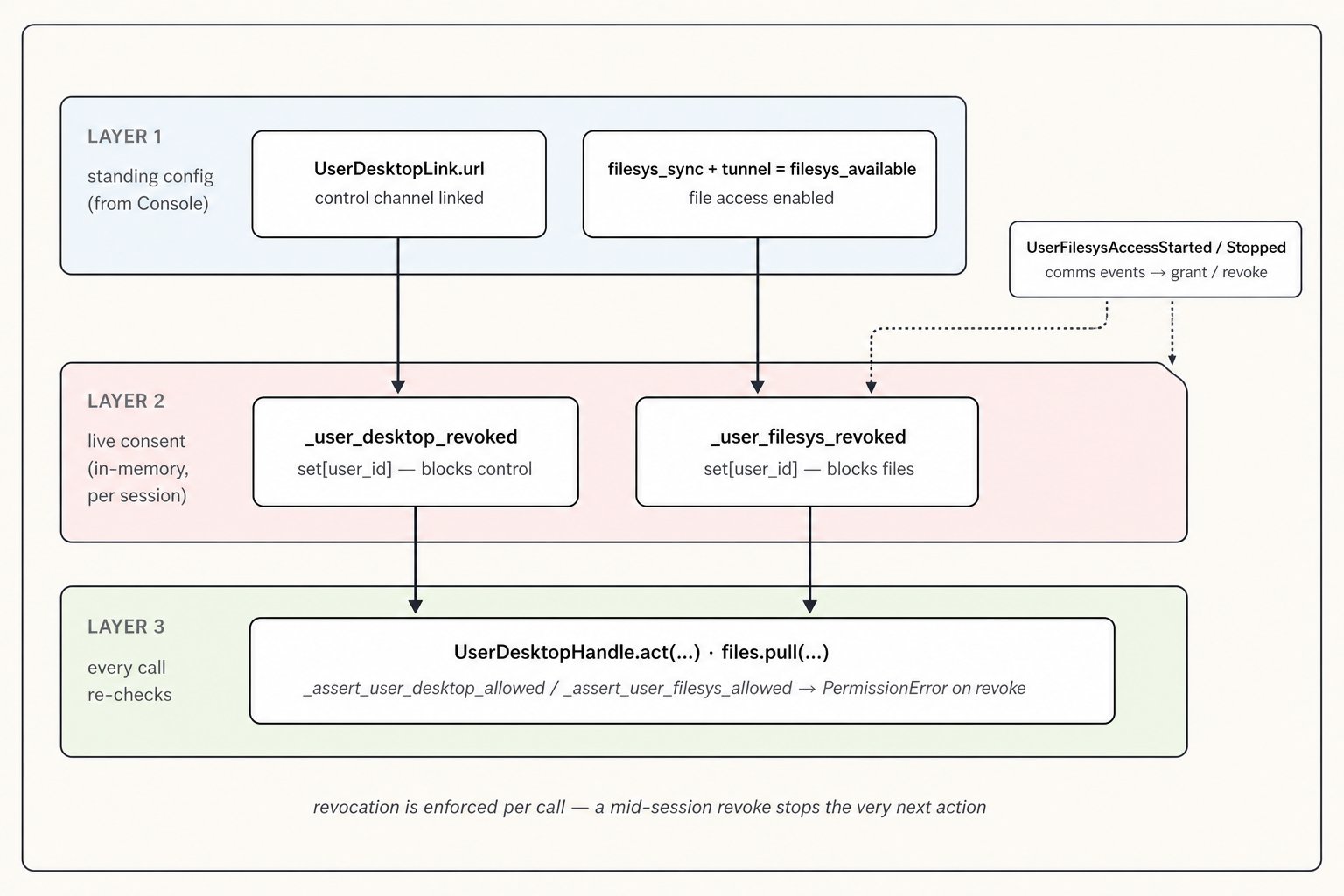 Access control is layered, and each layer answers a different question:
1. **Standing configuration** — *has the user set this up?* The link's
existence (with `url`) gates control; `filesys_available` gates files.
This layer is refreshed by `AssistantUpdateEvent` whenever the user
links, unlinks, or toggles filesystem access in the Console.
2. **Live session consent** — *has the user changed their mind right now?*
`ComputerPrimitives` holds two in-memory revoke sets,
`_user_desktop_revoked` and `_user_filesys_revoked`, mutated by the
grant/revoke pairs (`grant_user_desktop_control` /
`revoke_user_desktop_control` and the filesystem equivalents). The
filesystem pair is wired to comms events: `UserFilesysAccessStarted` /
`UserFilesysAccessStopped`
([`events.py`](https://github.com/unifyai/unify/blob/main/unify/conversation_manager/events.py))
arrive from the platform and are handled in
[`unify/conversation_manager/domains/event_handlers.py`](https://github.com/unifyai/unify/blob/main/unify/conversation_manager/domains/event_handlers.py),
which also snapshots recent conversation context so a running action is
*interjected* with the revocation rather than discovering it by crash.
3. **Per-call assertion** — *is this specific action still allowed?*
`_assert_user_desktop_allowed` / `_assert_user_filesys_allowed` run
inside every handle method and every `files.*` call, raising
`PermissionError` with an unambiguous stop instruction.
One nuance for extenders: the live revoke sets are enforced on the
**primitives path**. `UserDesktopTarget` (the `execute_code` surface)
checks standing capabilities at target-build time but does not re-assert
the in-memory sets per command — if you add new execution paths, route
consent through the `ComputerPrimitives` assertions to inherit mid-session
revocation.
A disambiguation that trips up most readers of this code:
`UserRemoteControlStarted` / `UserRemoteControlStopped` are the **inverse
feature** — the user taking mouse-and-keyboard control of the *assistant's*
VM during a Meet call (handled via
`ComputerPrimitives.set_user_remote_control`). They have nothing to do with
the linked user desktop despite the similar names.
## The prompt layer: what the assistant is told
Behavior users observe ("only on explicit request", "screen share first")
is implemented as prompt construction:
* `_build_user_machine_access_block` in
[`unify/conversation_manager/prompt_builders.py`](https://github.com/unifyai/unify/blob/main/unify/conversation_manager/prompt_builders.py)
renders the *"Seeing and controlling the user's machine"* section with
the strict resolution order — (1) active screen share/webcam, (2) linked
desktop, (3) neither → offer a share — plus files clauses that vary with
`filesys_available` vs. merely `filesys_sync` (consented but device not
yet connected: the assistant is told to say so, not to attempt the sync).
* `build_system_prompt` threads `has_linked_user_desktop`,
`user_filesys_consented`, `user_filesys_available`, and `acting_user_id`
down from the brain
([`unify/conversation_manager/domains/brain.py`](https://github.com/unifyai/unify/blob/main/unify/conversation_manager/domains/brain.py)),
so the whole block is per-turn and per-speaker.
* `ComputerEnvironment.get_prompt_context` in
[`unify/actor/environments/computer.py`](https://github.com/unifyai/unify/blob/main/unify/actor/environments/computer.py)
gives the actor the *"Your Desktop vs. a User's Desktop"* rules of
engagement: explicit request only, clarify when unsure, confirm before
consequential actions, respect `PermissionError` as final, never modify
their machine to work around an error — plus the macOS unlock flow using
the stored login-password secret.
* `console_ui.desktop_access_faq` in
[`unify/common/console_ui.py`](https://github.com/unifyai/unify/blob/main/unify/common/console_ui.py)
swaps the user-facing FAQ answer depending on whether a linked desktop
exists.
## Where to look next
The tests are the most instructive specification of the contract:
| Behavior | Test file |
| --------------------------------------------------------- | --------------------------------------------------------------------------------------------------------------------------------------------------------------- |
| Prompt blocks, acting-user resolution, `user_desktop_for` | [`tests/conversation_manager/core/test_prompt_builders.py`](https://github.com/unifyai/unify/blob/main/tests/conversation_manager/core/test_prompt_builders.py) |
| Surface resolution and `execute_code` gating | [`tests/actor/code_act/test_execution_surfaces.py`](https://github.com/unifyai/unify/blob/main/tests/actor/code_act/test_execution_surfaces.py) |
| SFTP exclude tiers and sync args | [`tests/file_manager/sync/test_user_sftp_excludes.py`](https://github.com/unifyai/unify/blob/main/tests/file_manager/sync/test_user_sftp_excludes.py) |
| Live filesystem consent events | [`tests/conversation_manager/core/test_event_handlers.py`](https://github.com/unifyai/unify/blob/main/tests/conversation_manager/core/test_event_handlers.py) |
| Comms routing of filesys events | [`tests/conversation_manager/core/test_comms_manager.py`](https://github.com/unifyai/unify/blob/main/tests/conversation_manager/core/test_comms_manager.py) |
And the common extension points:
* **New control verbs** — add to `_COMPUTER_METHODS` /
`_DESKTOP_METHODS` in
[`runtime.py`](https://github.com/unifyai/unify/blob/main/unify/function_manager/primitives/runtime.py)
and implement on the backend contract in
[`computer_backends.py`](https://github.com/unifyai/unify/blob/main/unify/function_manager/computer_backends.py);
the handle picks them up mechanically.
* **New exclusion rules** — extend the tier tuples in
[`user_sftp.py`](https://github.com/unifyai/unify/blob/main/unify/file_manager/sync/user_sftp.py);
keep the tier split (truthful `list`, lean `pull`/`sync`) intact.
* **New execution paths** — implement an `ExecutionTarget`
([`targets/base.py`](https://github.com/unifyai/unify/blob/main/unify/actor/execution/targets/base.py))
and register it in the factory; remember the consent note above.
Access control is layered, and each layer answers a different question:
1. **Standing configuration** — *has the user set this up?* The link's
existence (with `url`) gates control; `filesys_available` gates files.
This layer is refreshed by `AssistantUpdateEvent` whenever the user
links, unlinks, or toggles filesystem access in the Console.
2. **Live session consent** — *has the user changed their mind right now?*
`ComputerPrimitives` holds two in-memory revoke sets,
`_user_desktop_revoked` and `_user_filesys_revoked`, mutated by the
grant/revoke pairs (`grant_user_desktop_control` /
`revoke_user_desktop_control` and the filesystem equivalents). The
filesystem pair is wired to comms events: `UserFilesysAccessStarted` /
`UserFilesysAccessStopped`
([`events.py`](https://github.com/unifyai/unify/blob/main/unify/conversation_manager/events.py))
arrive from the platform and are handled in
[`unify/conversation_manager/domains/event_handlers.py`](https://github.com/unifyai/unify/blob/main/unify/conversation_manager/domains/event_handlers.py),
which also snapshots recent conversation context so a running action is
*interjected* with the revocation rather than discovering it by crash.
3. **Per-call assertion** — *is this specific action still allowed?*
`_assert_user_desktop_allowed` / `_assert_user_filesys_allowed` run
inside every handle method and every `files.*` call, raising
`PermissionError` with an unambiguous stop instruction.
One nuance for extenders: the live revoke sets are enforced on the
**primitives path**. `UserDesktopTarget` (the `execute_code` surface)
checks standing capabilities at target-build time but does not re-assert
the in-memory sets per command — if you add new execution paths, route
consent through the `ComputerPrimitives` assertions to inherit mid-session
revocation.
A disambiguation that trips up most readers of this code:
`UserRemoteControlStarted` / `UserRemoteControlStopped` are the **inverse
feature** — the user taking mouse-and-keyboard control of the *assistant's*
VM during a Meet call (handled via
`ComputerPrimitives.set_user_remote_control`). They have nothing to do with
the linked user desktop despite the similar names.
## The prompt layer: what the assistant is told
Behavior users observe ("only on explicit request", "screen share first")
is implemented as prompt construction:
* `_build_user_machine_access_block` in
[`unify/conversation_manager/prompt_builders.py`](https://github.com/unifyai/unify/blob/main/unify/conversation_manager/prompt_builders.py)
renders the *"Seeing and controlling the user's machine"* section with
the strict resolution order — (1) active screen share/webcam, (2) linked
desktop, (3) neither → offer a share — plus files clauses that vary with
`filesys_available` vs. merely `filesys_sync` (consented but device not
yet connected: the assistant is told to say so, not to attempt the sync).
* `build_system_prompt` threads `has_linked_user_desktop`,
`user_filesys_consented`, `user_filesys_available`, and `acting_user_id`
down from the brain
([`unify/conversation_manager/domains/brain.py`](https://github.com/unifyai/unify/blob/main/unify/conversation_manager/domains/brain.py)),
so the whole block is per-turn and per-speaker.
* `ComputerEnvironment.get_prompt_context` in
[`unify/actor/environments/computer.py`](https://github.com/unifyai/unify/blob/main/unify/actor/environments/computer.py)
gives the actor the *"Your Desktop vs. a User's Desktop"* rules of
engagement: explicit request only, clarify when unsure, confirm before
consequential actions, respect `PermissionError` as final, never modify
their machine to work around an error — plus the macOS unlock flow using
the stored login-password secret.
* `console_ui.desktop_access_faq` in
[`unify/common/console_ui.py`](https://github.com/unifyai/unify/blob/main/unify/common/console_ui.py)
swaps the user-facing FAQ answer depending on whether a linked desktop
exists.
## Where to look next
The tests are the most instructive specification of the contract:
| Behavior | Test file |
| --------------------------------------------------------- | --------------------------------------------------------------------------------------------------------------------------------------------------------------- |
| Prompt blocks, acting-user resolution, `user_desktop_for` | [`tests/conversation_manager/core/test_prompt_builders.py`](https://github.com/unifyai/unify/blob/main/tests/conversation_manager/core/test_prompt_builders.py) |
| Surface resolution and `execute_code` gating | [`tests/actor/code_act/test_execution_surfaces.py`](https://github.com/unifyai/unify/blob/main/tests/actor/code_act/test_execution_surfaces.py) |
| SFTP exclude tiers and sync args | [`tests/file_manager/sync/test_user_sftp_excludes.py`](https://github.com/unifyai/unify/blob/main/tests/file_manager/sync/test_user_sftp_excludes.py) |
| Live filesystem consent events | [`tests/conversation_manager/core/test_event_handlers.py`](https://github.com/unifyai/unify/blob/main/tests/conversation_manager/core/test_event_handlers.py) |
| Comms routing of filesys events | [`tests/conversation_manager/core/test_comms_manager.py`](https://github.com/unifyai/unify/blob/main/tests/conversation_manager/core/test_comms_manager.py) |
And the common extension points:
* **New control verbs** — add to `_COMPUTER_METHODS` /
`_DESKTOP_METHODS` in
[`runtime.py`](https://github.com/unifyai/unify/blob/main/unify/function_manager/primitives/runtime.py)
and implement on the backend contract in
[`computer_backends.py`](https://github.com/unifyai/unify/blob/main/unify/function_manager/computer_backends.py);
the handle picks them up mechanically.
* **New exclusion rules** — extend the tier tuples in
[`user_sftp.py`](https://github.com/unifyai/unify/blob/main/unify/file_manager/sync/user_sftp.py);
keep the tier split (truthful `list`, lean `pull`/`sync`) intact.
* **New execution paths** — implement an `ExecutionTarget`
([`targets/base.py`](https://github.com/unifyai/unify/blob/main/unify/actor/execution/targets/base.py))
and register it in the factory; remember the consent note above.