> ## Documentation Index
> Fetch the complete documentation index at: https://docs.unify.ai/llms.txt
> Use this file to discover all available pages before exploring further.
# Developers
> How the assistant's computer actually works — the open-source unify internals
Everything in this section so far describes what the assistant's computer
does. This page explains **how**, at the code level, for developers using,
extending, or auditing the open-source
[unify](https://github.com/unifyai/unify) runtime. It covers the full
stack: the `primitives.computer.*` surface the actor programs against, the
HTTP backends beneath it, the agent-service that executes on the VM, the
desktop composition itself, the readiness/lifecycle events, workspace file
sync, execution surfaces, and the screen-share plumbing.
All references are to the open-source repo; the hosted VM pool and Console
are separate closed-source components that speak to these interfaces.
## The control stack
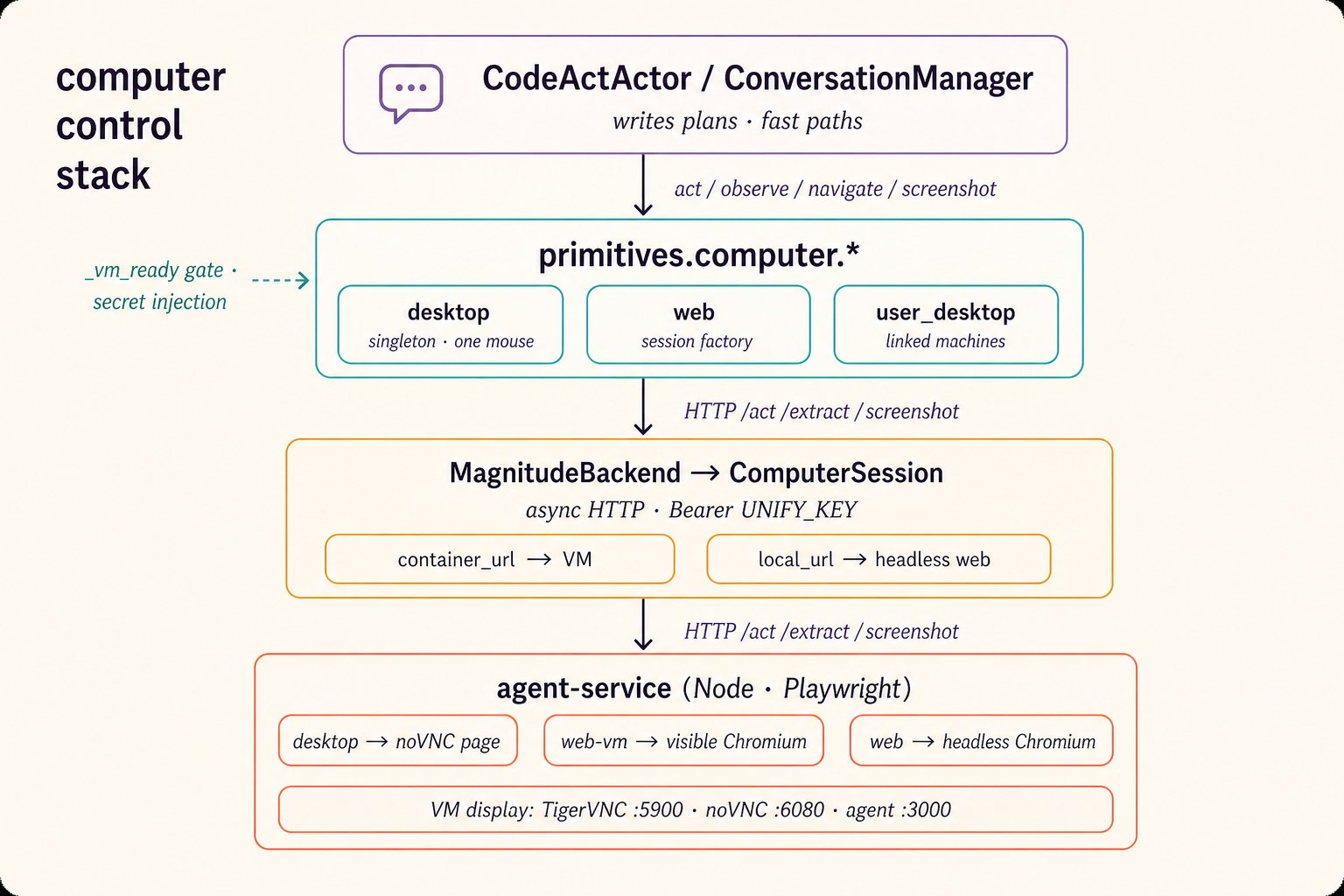 Computer control is layered, with a clean seam at each level:
1. **Callers** — actor plans (via
[`act`](https://github.com/unifyai/unify/blob/main/unify/actor/code_act_actor.py))
and the ConversationManager's fast-path tools both invoke the same
primitives.
2. **Primitives** —
[`ComputerPrimitives`](https://github.com/unifyai/unify/blob/main/unify/function_manager/primitives/runtime.py)
exposes three namespaces and owns readiness gating, secret injection,
and session routing.
3. **Backends** —
[`computer_backends.py`](https://github.com/unifyai/unify/blob/main/unify/function_manager/computer_backends.py)
translates method calls into HTTP against an agent-service.
4. **agent-service** — a Node/Express wrapper around the Magnitude
browser agent
([`agent-service/src/index.ts`](https://github.com/unifyai/unify/blob/main/agent-service/src/index.ts)),
running Playwright sessions on or off the VM.
A key design decision sits at the bottom: **desktop control is indirect**.
The agent-service's desktop mode opens the VM's own noVNC viewer page in a
headless Playwright browser and drives the desktop *through* it — mouse,
keyboard, and screenshots all pass through the noVNC canvas, which
guarantees that what the agent clicks and what it sees share one
coordinate space.
## The primitives layer
[`ComputerPrimitives`](https://github.com/unifyai/unify/blob/main/unify/function_manager/primitives/runtime.py)
is a singleton (all actors share one backend) with three namespaces:
| Namespace | Class | Semantics |
| ---------------------------------- | --------------------- | ---------------------------------------------------------------------------------------------------------------------------------------------------------------------------------------------------------------------- |
| `primitives.computer.desktop` | `_ComputerNamespace` | The managed VM's display. **Singleton** — one desktop, one mouse; `create_session("desktop")` is forbidden. |
| `primitives.computer.web` | `_WebSessionFactory` | Browser session factory: `new_session(visible=True)` → a visible Chromium on the VM (`web-vm` mode), `visible=False` → headless Chromium on the Unity host (`web` mode). Also `get_session(id)` and `list_sessions()`. |
| `primitives.computer.user_desktop` | `_UserDesktopFactory` | A user's own linked machine — a separate consent-gated system, documented with [Your Computer](/your-computer/overview). |
Two method sets define what each namespace exposes: `_COMPUTER_METHODS`
(the full surface — `act`, `observe`, `query`, `navigate`, `get_links`,
`get_content`, `get_screenshot`, the low-level input methods,
`solve_captcha`, `execute_actions`) and `_DESKTOP_METHODS`, which strips
`get_content` (the noVNC page's DOM is meaningless) and `solve_captcha`
(web sessions only).
Every call routes through `_make_session_method`, which does the
load-bearing work:
* **Readiness gating** — waits up to 300 s on the module-level
`threading.Event` `_vm_ready` before any managed-VM call. Nothing
touches the VM until the lifecycle pipeline (below) sets the event.
* **Secret injection** — for `act`, `observe`, and `type_text`, the first
argument passes through the SecretManager's `from_placeholder`, so
plans can write `${SERVICE_API_KEY}` without the raw value ever
appearing in LLM-visible text.
* **Screenshot decoding** — `get_screenshot` returns a **PIL `Image`**
(decoded from base64) so actor code can `display(...)` it or hand bytes
to `query_llm(images=[...])`.
* **Dead-session detection** — a `ComputerAgentError` with
`error_type == "session_not_found"` (or closed browser/context/page
messages) marks a `WebSessionHandle` inactive rather than retrying into
a void.
`WebSessionHandle` wraps one live session with the full method set plus
`stop()`; handles carry `session_id`, `label`, `visible`, and `active`, and
sessions can be re-attached later by numeric ID from a different actor run.
## Backends
[`computer_backends.py`](https://github.com/unifyai/unify/blob/main/unify/function_manager/computer_backends.py)
defines the contract and both implementations:
* **`ComputerBackend`** — the ABC. The two headline methods have distinct
contracts: `act(instruction, verify=False)` is *goal-level* (the agent
plans multi-step UI work from vision; `verify=True` re-observes in a
loop until the goal is confirmed), while `observe(query,
response_format)` is strictly *read-only* extraction from the current
screen, optionally into a Pydantic model. `query()` asks the session's
own memory of past actions, not the live page. A
`_LowLevelActionsMixin` provides `click`, `type_text`, `scroll`,
`press_key`, tab management, and friends — all compiled to
`execute_actions` payloads that run without any LLM in the loop.
* **`ComputerSession`** — the per-session async HTTP client. Every method
maps to one agent-service endpoint (`/act`, `/extract`, `/query`,
`/nav`, `/screenshot`, `/links`, `/content`, `/execute-actions`,
`/captcha/solve`, `/stop`), with the session ID injected into each
payload and `SESSION_DETAILS.unify_key` as the Bearer token. Desktop
sessions differ in two ways: `navigate` is expressed as an `act`
("Go to the page: …"), and `observe` forces `bypassDomProcessing` —
screenshot-only vision.
* **`MagnitudeBackend`** — the multi-mode factory. It holds **two base
URLs**: `container_url` (the VM — serves `desktop` and `web-vm`
sessions) and `local_url` (the Unity host — serves headless `web`
sessions, default `http://localhost:3000`). `get_session(mode)` lazily
creates one session per mode; parallel web sessions come from
`create_session`. Errors are typed end-to-end: agent-service failures
surface as `ComputerAgentError(error_type, message)`.
* **`MockComputerBackend`** — a full in-process stand-in used by the test
suite: canned `ActResult`s and a valid 32×32 PNG screenshot, so flows
exercise the whole call path with no Playwright.
`solve_captcha()` (web sessions) drives AntiCaptcha for reCAPTCHA v2 only,
keyed by `ANTICAPTCHA_KEY` on the agent-service; the solved token is
injected page-side and never returned to the caller.
## The agent-service
The Node service in
[`agent-service/`](https://github.com/unifyai/unify/blob/main/agent-service/src/index.ts)
is the only process that touches Playwright. Highlights:
* **Auth** is dual: the Bearer token must equal the service's own
`UNIFY_KEY` *and* is verified against Orchestra's `/user/basic-info` —
a stolen URL alone is useless.
* **Session modes**: `POST /start` with `{mode: "desktop" | "web-vm" |
"web"}`. Desktop mode waits for noVNC, opens the viewer page in
Playwright, and instructs the Magnitude agent that it is controlling a
VNC desktop. `web-vm` launches a visible Chromium on the VM's display;
`web` launches headless Chromium wherever the service runs.
* **Beyond the browser**: `POST /exec` runs shell commands (with
`shell_mode: "powershell" | "cmd"` on Windows) and `POST /files`
reads/writes under the `~/Unity/Local` workspace — these power the
[execution surfaces](#execution-surfaces), not the browser sessions.
* **Screenshots** come in two flavors: `POST /screenshot` (live capture,
with cursor position) and `POST /screenshot/latest` (the cached frame
from the last action — effectively free, used at high frequency during
screen shares).
## The VM desktop itself
[`deploy/desktop/`](https://github.com/unifyai/unify/blob/main/deploy/desktop/README.md)
contains the desktop composition that runs on the VM, supervised by
`supervisord`:
| Component | Role | Port |
| ------------------------------- | ------------------------------------- | ---- |
| TigerVNC + XFCE4 (`desktop.sh`) | The actual display (`:99`, 1920×1080) | 5900 |
| websockify + noVNC | Browser-facing viewer (`custom.html`) | 6080 |
| agent-service | Automation API | 3000 |
| sshd | SFTP endpoint for workspace sync | 2222 |
The VNC password is derived from the first 8 characters of the assistant's
`UNIFY_KEY` (legacy VNC caps passwords at 8 chars). In self-host, a Caddy
reverse proxy ([`Caddyfile.selfhost`](https://github.com/unifyai/unify/blob/main/deploy/desktop/Caddyfile.selfhost))
maps the public shape used everywhere: `/desktop/*` → noVNC and `/api/*` →
agent-service. That shape is the **`desktop_url` contract**: given a base
URL, the Console live view is `{base}/desktop/custom.html` and the
automation API is `{base}/api`.
## Lifecycle: from cold start to ready
Computer control is layered, with a clean seam at each level:
1. **Callers** — actor plans (via
[`act`](https://github.com/unifyai/unify/blob/main/unify/actor/code_act_actor.py))
and the ConversationManager's fast-path tools both invoke the same
primitives.
2. **Primitives** —
[`ComputerPrimitives`](https://github.com/unifyai/unify/blob/main/unify/function_manager/primitives/runtime.py)
exposes three namespaces and owns readiness gating, secret injection,
and session routing.
3. **Backends** —
[`computer_backends.py`](https://github.com/unifyai/unify/blob/main/unify/function_manager/computer_backends.py)
translates method calls into HTTP against an agent-service.
4. **agent-service** — a Node/Express wrapper around the Magnitude
browser agent
([`agent-service/src/index.ts`](https://github.com/unifyai/unify/blob/main/agent-service/src/index.ts)),
running Playwright sessions on or off the VM.
A key design decision sits at the bottom: **desktop control is indirect**.
The agent-service's desktop mode opens the VM's own noVNC viewer page in a
headless Playwright browser and drives the desktop *through* it — mouse,
keyboard, and screenshots all pass through the noVNC canvas, which
guarantees that what the agent clicks and what it sees share one
coordinate space.
## The primitives layer
[`ComputerPrimitives`](https://github.com/unifyai/unify/blob/main/unify/function_manager/primitives/runtime.py)
is a singleton (all actors share one backend) with three namespaces:
| Namespace | Class | Semantics |
| ---------------------------------- | --------------------- | ---------------------------------------------------------------------------------------------------------------------------------------------------------------------------------------------------------------------- |
| `primitives.computer.desktop` | `_ComputerNamespace` | The managed VM's display. **Singleton** — one desktop, one mouse; `create_session("desktop")` is forbidden. |
| `primitives.computer.web` | `_WebSessionFactory` | Browser session factory: `new_session(visible=True)` → a visible Chromium on the VM (`web-vm` mode), `visible=False` → headless Chromium on the Unity host (`web` mode). Also `get_session(id)` and `list_sessions()`. |
| `primitives.computer.user_desktop` | `_UserDesktopFactory` | A user's own linked machine — a separate consent-gated system, documented with [Your Computer](/your-computer/overview). |
Two method sets define what each namespace exposes: `_COMPUTER_METHODS`
(the full surface — `act`, `observe`, `query`, `navigate`, `get_links`,
`get_content`, `get_screenshot`, the low-level input methods,
`solve_captcha`, `execute_actions`) and `_DESKTOP_METHODS`, which strips
`get_content` (the noVNC page's DOM is meaningless) and `solve_captcha`
(web sessions only).
Every call routes through `_make_session_method`, which does the
load-bearing work:
* **Readiness gating** — waits up to 300 s on the module-level
`threading.Event` `_vm_ready` before any managed-VM call. Nothing
touches the VM until the lifecycle pipeline (below) sets the event.
* **Secret injection** — for `act`, `observe`, and `type_text`, the first
argument passes through the SecretManager's `from_placeholder`, so
plans can write `${SERVICE_API_KEY}` without the raw value ever
appearing in LLM-visible text.
* **Screenshot decoding** — `get_screenshot` returns a **PIL `Image`**
(decoded from base64) so actor code can `display(...)` it or hand bytes
to `query_llm(images=[...])`.
* **Dead-session detection** — a `ComputerAgentError` with
`error_type == "session_not_found"` (or closed browser/context/page
messages) marks a `WebSessionHandle` inactive rather than retrying into
a void.
`WebSessionHandle` wraps one live session with the full method set plus
`stop()`; handles carry `session_id`, `label`, `visible`, and `active`, and
sessions can be re-attached later by numeric ID from a different actor run.
## Backends
[`computer_backends.py`](https://github.com/unifyai/unify/blob/main/unify/function_manager/computer_backends.py)
defines the contract and both implementations:
* **`ComputerBackend`** — the ABC. The two headline methods have distinct
contracts: `act(instruction, verify=False)` is *goal-level* (the agent
plans multi-step UI work from vision; `verify=True` re-observes in a
loop until the goal is confirmed), while `observe(query,
response_format)` is strictly *read-only* extraction from the current
screen, optionally into a Pydantic model. `query()` asks the session's
own memory of past actions, not the live page. A
`_LowLevelActionsMixin` provides `click`, `type_text`, `scroll`,
`press_key`, tab management, and friends — all compiled to
`execute_actions` payloads that run without any LLM in the loop.
* **`ComputerSession`** — the per-session async HTTP client. Every method
maps to one agent-service endpoint (`/act`, `/extract`, `/query`,
`/nav`, `/screenshot`, `/links`, `/content`, `/execute-actions`,
`/captcha/solve`, `/stop`), with the session ID injected into each
payload and `SESSION_DETAILS.unify_key` as the Bearer token. Desktop
sessions differ in two ways: `navigate` is expressed as an `act`
("Go to the page: …"), and `observe` forces `bypassDomProcessing` —
screenshot-only vision.
* **`MagnitudeBackend`** — the multi-mode factory. It holds **two base
URLs**: `container_url` (the VM — serves `desktop` and `web-vm`
sessions) and `local_url` (the Unity host — serves headless `web`
sessions, default `http://localhost:3000`). `get_session(mode)` lazily
creates one session per mode; parallel web sessions come from
`create_session`. Errors are typed end-to-end: agent-service failures
surface as `ComputerAgentError(error_type, message)`.
* **`MockComputerBackend`** — a full in-process stand-in used by the test
suite: canned `ActResult`s and a valid 32×32 PNG screenshot, so flows
exercise the whole call path with no Playwright.
`solve_captcha()` (web sessions) drives AntiCaptcha for reCAPTCHA v2 only,
keyed by `ANTICAPTCHA_KEY` on the agent-service; the solved token is
injected page-side and never returned to the caller.
## The agent-service
The Node service in
[`agent-service/`](https://github.com/unifyai/unify/blob/main/agent-service/src/index.ts)
is the only process that touches Playwright. Highlights:
* **Auth** is dual: the Bearer token must equal the service's own
`UNIFY_KEY` *and* is verified against Orchestra's `/user/basic-info` —
a stolen URL alone is useless.
* **Session modes**: `POST /start` with `{mode: "desktop" | "web-vm" |
"web"}`. Desktop mode waits for noVNC, opens the viewer page in
Playwright, and instructs the Magnitude agent that it is controlling a
VNC desktop. `web-vm` launches a visible Chromium on the VM's display;
`web` launches headless Chromium wherever the service runs.
* **Beyond the browser**: `POST /exec` runs shell commands (with
`shell_mode: "powershell" | "cmd"` on Windows) and `POST /files`
reads/writes under the `~/Unity/Local` workspace — these power the
[execution surfaces](#execution-surfaces), not the browser sessions.
* **Screenshots** come in two flavors: `POST /screenshot` (live capture,
with cursor position) and `POST /screenshot/latest` (the cached frame
from the last action — effectively free, used at high frequency during
screen shares).
## The VM desktop itself
[`deploy/desktop/`](https://github.com/unifyai/unify/blob/main/deploy/desktop/README.md)
contains the desktop composition that runs on the VM, supervised by
`supervisord`:
| Component | Role | Port |
| ------------------------------- | ------------------------------------- | ---- |
| TigerVNC + XFCE4 (`desktop.sh`) | The actual display (`:99`, 1920×1080) | 5900 |
| websockify + noVNC | Browser-facing viewer (`custom.html`) | 6080 |
| agent-service | Automation API | 3000 |
| sshd | SFTP endpoint for workspace sync | 2222 |
The VNC password is derived from the first 8 characters of the assistant's
`UNIFY_KEY` (legacy VNC caps passwords at 8 chars). In self-host, a Caddy
reverse proxy ([`Caddyfile.selfhost`](https://github.com/unifyai/unify/blob/main/deploy/desktop/Caddyfile.selfhost))
maps the public shape used everywhere: `/desktop/*` → noVNC and `/api/*` →
agent-service. That shape is the **`desktop_url` contract**: given a base
URL, the Console live view is `{base}/desktop/custom.html` and the
automation API is `{base}/api`.
## Lifecycle: from cold start to ready
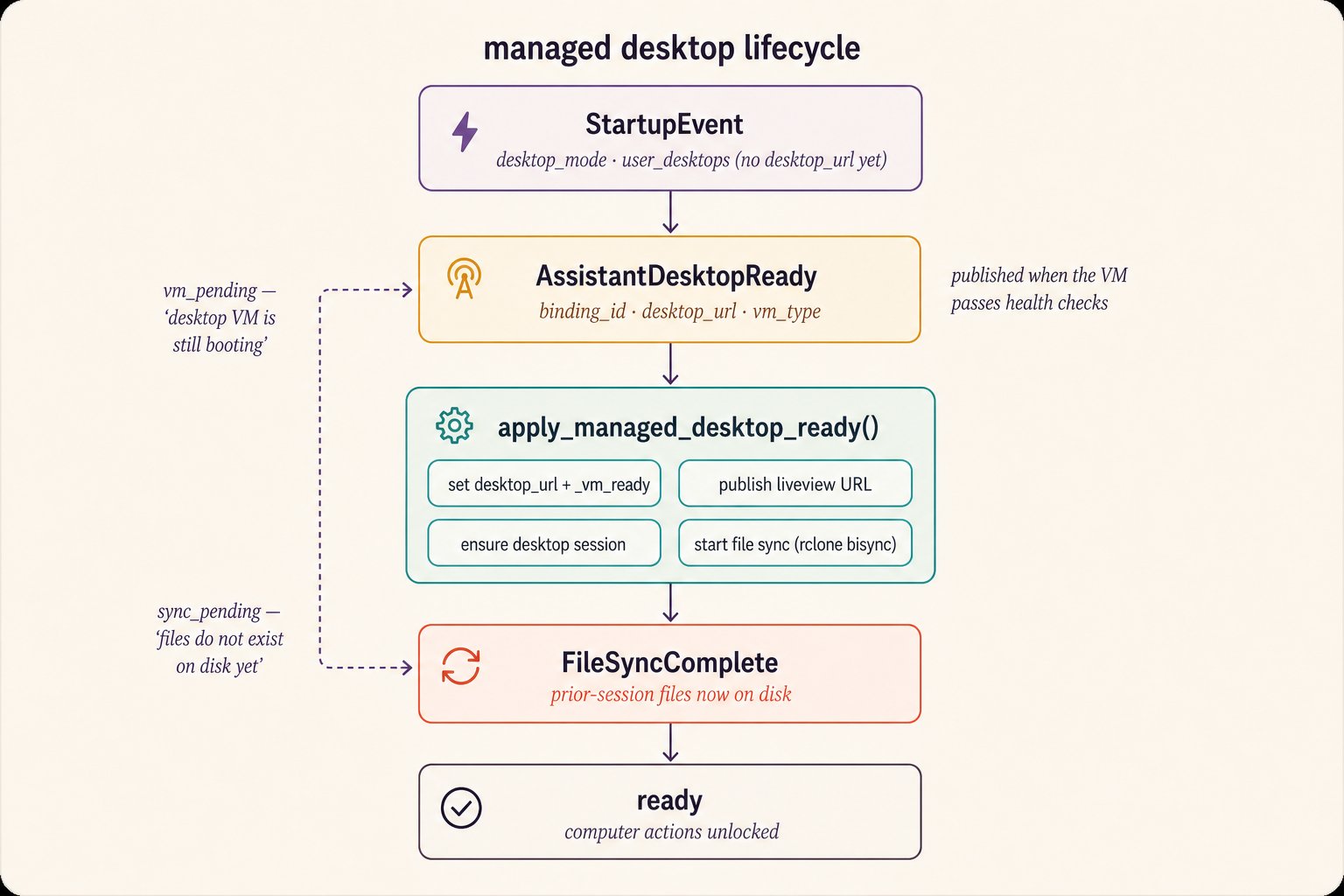 Desktop state lives on the global session singleton
([`session_details.py`](https://github.com/unifyai/unify/blob/main/unify/session_details.py)):
`AssistantDetails.desktop_mode` (`"ubuntu"` / `"windows"`),
`desktop_url`, and the `has_managed_desktop` property requiring both.
Notably, the `StartupEvent` populates `desktop_mode` but **not**
`desktop_url` — the URL is only set when the VM is actually reachable.
Two events in
[`events.py`](https://github.com/unifyai/unify/blob/main/unify/conversation_manager/events.py)
drive the transition:
* **`AssistantDesktopReady`** (`binding_id`, `desktop_url`, `vm_type`) —
published by the hosting layer once the VM passes health checks.
* **`FileSyncComplete`** — the initial workspace bisync has finished.
The handler in
[`event_handlers.py`](https://github.com/unifyai/unify/blob/main/unify/conversation_manager/domains/event_handlers.py)
guards against stale `binding_id`s and calls
**`apply_managed_desktop_ready()`** in
[`self_host_desktop.py`](https://github.com/unifyai/unify/blob/main/unify/conversation_manager/domains/self_host_desktop.py)
— the single convergence point for hosted and self-host paths. In order,
it sets `SESSION_DETAILS.assistant.desktop_url`, publishes the liveview
URL for the Console, sets the `_vm_ready` event and flips
`cm.vm_ready`, warms the desktop session
(`_ensure_desktop_session`, with exponential backoff), and kicks off
file sync — publishing `FileSyncComplete` when the initial pass lands.
Self-host deployments can shortcut the whole dance:
`bootstrap_managed_desktop_on_startup()` probes
`{api_base}/desktop/vnc.html` at boot and applies readiness without
waiting for any event.
Readiness gating is **prompt-level**, rendered by
[`renderer.py`](https://github.com/unifyai/unify/blob/main/unify/conversation_manager/domains/renderer.py):
while pending, the system prompt carries `` ("Your managed desktop VM is still booting…") and
then `status='sync_pending'` ("Files from previous sessions … DO NOT EXIST
on disk yet"), each block disappearing as its flag flips. The behavioral
contract — defer computer work while pending, follow up after
`FileSyncComplete` — is pinned by
[`tests/conversation_manager/core/test_infrastructure_readiness.py`](https://github.com/unifyai/unify/blob/main/tests/conversation_manager/core/test_infrastructure_readiness.py).
## Workspace file sync
The VM and the Unity runtime share one workspace, kept in step by
[`unify/file_manager/sync/`](https://github.com/unifyai/unify/blob/main/unify/file_manager/sync/manager.py):
* **`SyncConfig`**
([`config.py`](https://github.com/unifyai/unify/blob/main/unify/file_manager/sync/config.py))
— rclone over **SFTP** to the host from `desktop_url`, port 2222, user
`unityuser`, `~/Unity/Local` (from `get_local_root()` in
[`file_manager/settings.py`](https://github.com/unifyai/unify/blob/main/unify/file_manager/settings.py))
↔ `/Unity/Local` on the VM (`C:\Unity\Local` on Windows). Disabled
entirely under a shared mount (`UNITY_DESKTOP_SHARED_MOUNT=1`).
* **`RcloneSync`**
([`rclone.py`](https://github.com/unifyai/unify/blob/main/unify/file_manager/sync/rclone.py))
— `bisync` with `--conflict-resolve newer` (latest modification wins),
automatic `--resync` recovery from corrupted baselines, plus
per-file `copyto`/`deletefile` for write-through.
* **`SyncManager`**
([`manager.py`](https://github.com/unifyai/unify/blob/main/unify/file_manager/sync/manager.py))
— fetches the SSH key from the backend, runs the initial
`bisync(force_resync=True)`, then polls a 30-second bisync loop;
`on_file_write`/`on_file_delete` hooks give writes immediate push
semantics. It's wired into the FileManager through
`LocalFileSystemAdapter.start_sync()`.
The workspace layout the actor is told about (the filesystem-context
table in
[`actor/prompt_builders.py`](https://github.com/unifyai/unify/blob/main/unify/actor/prompt_builders.py)):
| Path | Semantics |
| -------------------------------------------------------------------- | ------------------------------------------------------------------------ |
| `Attachments/` | All exchanged attachments as `{id}_{filename}`; persists across sessions |
| `Outputs/` | Staging for outbound files; cleared between sessions |
| `Screenshots/Assistant/`, `Screenshots/User/`, `Screenshots/Webcam/` | Read-only frame archives; cleared between sessions |
| `.env` | SecretManager's local mirror |
| everything else | Persistent working files |
## Execution surfaces
Shell and Python execution is orthogonal to the browser stack, organized
by
[`ExecutionSurface`](https://github.com/unifyai/unify/blob/main/unify/actor/execution/surface.py):
`LOCAL` (the Unity host process), `ASSISTANT_DESKTOP` (the managed VM),
and `USER_DESKTOP` (a linked user machine). Each has a target class in
[`unify/actor/execution/targets/`](https://github.com/unifyai/unify/blob/main/unify/actor/execution/targets/assistant_desktop.py):
* **`AssistantDesktopTarget`** runs commands through
[`AgentServiceExecClient`](https://github.com/unifyai/unify/blob/main/unify/actor/execution/targets/exec_client.py)
(`POST {desktop_url}/api/exec`), forcing `shell_mode="powershell"` when
`desktop_mode == "windows"`. File movement rides the bisync.
* **Windows-only functions**: stored functions flagged
`windows_os_required=True` are routed by
[`function_manager.py`](https://github.com/unifyai/unify/blob/main/unify/function_manager/function_manager.py)
to the Windows VM — the wrapper script is staged into the sync root,
bisynced across, executed via PowerShell, and the JSON result bisynced
back. See
[`tests/function_manager/python/test_remote_windows.py`](https://github.com/unifyai/unify/blob/main/tests/function_manager/python/test_remote_windows.py)
for the full round trip.
## Screen share & remote control
Desktop state lives on the global session singleton
([`session_details.py`](https://github.com/unifyai/unify/blob/main/unify/session_details.py)):
`AssistantDetails.desktop_mode` (`"ubuntu"` / `"windows"`),
`desktop_url`, and the `has_managed_desktop` property requiring both.
Notably, the `StartupEvent` populates `desktop_mode` but **not**
`desktop_url` — the URL is only set when the VM is actually reachable.
Two events in
[`events.py`](https://github.com/unifyai/unify/blob/main/unify/conversation_manager/events.py)
drive the transition:
* **`AssistantDesktopReady`** (`binding_id`, `desktop_url`, `vm_type`) —
published by the hosting layer once the VM passes health checks.
* **`FileSyncComplete`** — the initial workspace bisync has finished.
The handler in
[`event_handlers.py`](https://github.com/unifyai/unify/blob/main/unify/conversation_manager/domains/event_handlers.py)
guards against stale `binding_id`s and calls
**`apply_managed_desktop_ready()`** in
[`self_host_desktop.py`](https://github.com/unifyai/unify/blob/main/unify/conversation_manager/domains/self_host_desktop.py)
— the single convergence point for hosted and self-host paths. In order,
it sets `SESSION_DETAILS.assistant.desktop_url`, publishes the liveview
URL for the Console, sets the `_vm_ready` event and flips
`cm.vm_ready`, warms the desktop session
(`_ensure_desktop_session`, with exponential backoff), and kicks off
file sync — publishing `FileSyncComplete` when the initial pass lands.
Self-host deployments can shortcut the whole dance:
`bootstrap_managed_desktop_on_startup()` probes
`{api_base}/desktop/vnc.html` at boot and applies readiness without
waiting for any event.
Readiness gating is **prompt-level**, rendered by
[`renderer.py`](https://github.com/unifyai/unify/blob/main/unify/conversation_manager/domains/renderer.py):
while pending, the system prompt carries `` ("Your managed desktop VM is still booting…") and
then `status='sync_pending'` ("Files from previous sessions … DO NOT EXIST
on disk yet"), each block disappearing as its flag flips. The behavioral
contract — defer computer work while pending, follow up after
`FileSyncComplete` — is pinned by
[`tests/conversation_manager/core/test_infrastructure_readiness.py`](https://github.com/unifyai/unify/blob/main/tests/conversation_manager/core/test_infrastructure_readiness.py).
## Workspace file sync
The VM and the Unity runtime share one workspace, kept in step by
[`unify/file_manager/sync/`](https://github.com/unifyai/unify/blob/main/unify/file_manager/sync/manager.py):
* **`SyncConfig`**
([`config.py`](https://github.com/unifyai/unify/blob/main/unify/file_manager/sync/config.py))
— rclone over **SFTP** to the host from `desktop_url`, port 2222, user
`unityuser`, `~/Unity/Local` (from `get_local_root()` in
[`file_manager/settings.py`](https://github.com/unifyai/unify/blob/main/unify/file_manager/settings.py))
↔ `/Unity/Local` on the VM (`C:\Unity\Local` on Windows). Disabled
entirely under a shared mount (`UNITY_DESKTOP_SHARED_MOUNT=1`).
* **`RcloneSync`**
([`rclone.py`](https://github.com/unifyai/unify/blob/main/unify/file_manager/sync/rclone.py))
— `bisync` with `--conflict-resolve newer` (latest modification wins),
automatic `--resync` recovery from corrupted baselines, plus
per-file `copyto`/`deletefile` for write-through.
* **`SyncManager`**
([`manager.py`](https://github.com/unifyai/unify/blob/main/unify/file_manager/sync/manager.py))
— fetches the SSH key from the backend, runs the initial
`bisync(force_resync=True)`, then polls a 30-second bisync loop;
`on_file_write`/`on_file_delete` hooks give writes immediate push
semantics. It's wired into the FileManager through
`LocalFileSystemAdapter.start_sync()`.
The workspace layout the actor is told about (the filesystem-context
table in
[`actor/prompt_builders.py`](https://github.com/unifyai/unify/blob/main/unify/actor/prompt_builders.py)):
| Path | Semantics |
| -------------------------------------------------------------------- | ------------------------------------------------------------------------ |
| `Attachments/` | All exchanged attachments as `{id}_{filename}`; persists across sessions |
| `Outputs/` | Staging for outbound files; cleared between sessions |
| `Screenshots/Assistant/`, `Screenshots/User/`, `Screenshots/Webcam/` | Read-only frame archives; cleared between sessions |
| `.env` | SecretManager's local mirror |
| everything else | Persistent working files |
## Execution surfaces
Shell and Python execution is orthogonal to the browser stack, organized
by
[`ExecutionSurface`](https://github.com/unifyai/unify/blob/main/unify/actor/execution/surface.py):
`LOCAL` (the Unity host process), `ASSISTANT_DESKTOP` (the managed VM),
and `USER_DESKTOP` (a linked user machine). Each has a target class in
[`unify/actor/execution/targets/`](https://github.com/unifyai/unify/blob/main/unify/actor/execution/targets/assistant_desktop.py):
* **`AssistantDesktopTarget`** runs commands through
[`AgentServiceExecClient`](https://github.com/unifyai/unify/blob/main/unify/actor/execution/targets/exec_client.py)
(`POST {desktop_url}/api/exec`), forcing `shell_mode="powershell"` when
`desktop_mode == "windows"`. File movement rides the bisync.
* **Windows-only functions**: stored functions flagged
`windows_os_required=True` are routed by
[`function_manager.py`](https://github.com/unifyai/unify/blob/main/unify/function_manager/function_manager.py)
to the Windows VM — the wrapper script is staged into the sync root,
bisynced across, executed via PowerShell, and the JSON result bisynced
back. See
[`tests/function_manager/python/test_remote_windows.py`](https://github.com/unifyai/unify/blob/main/tests/function_manager/python/test_remote_windows.py)
for the full round trip.
## Screen share & remote control
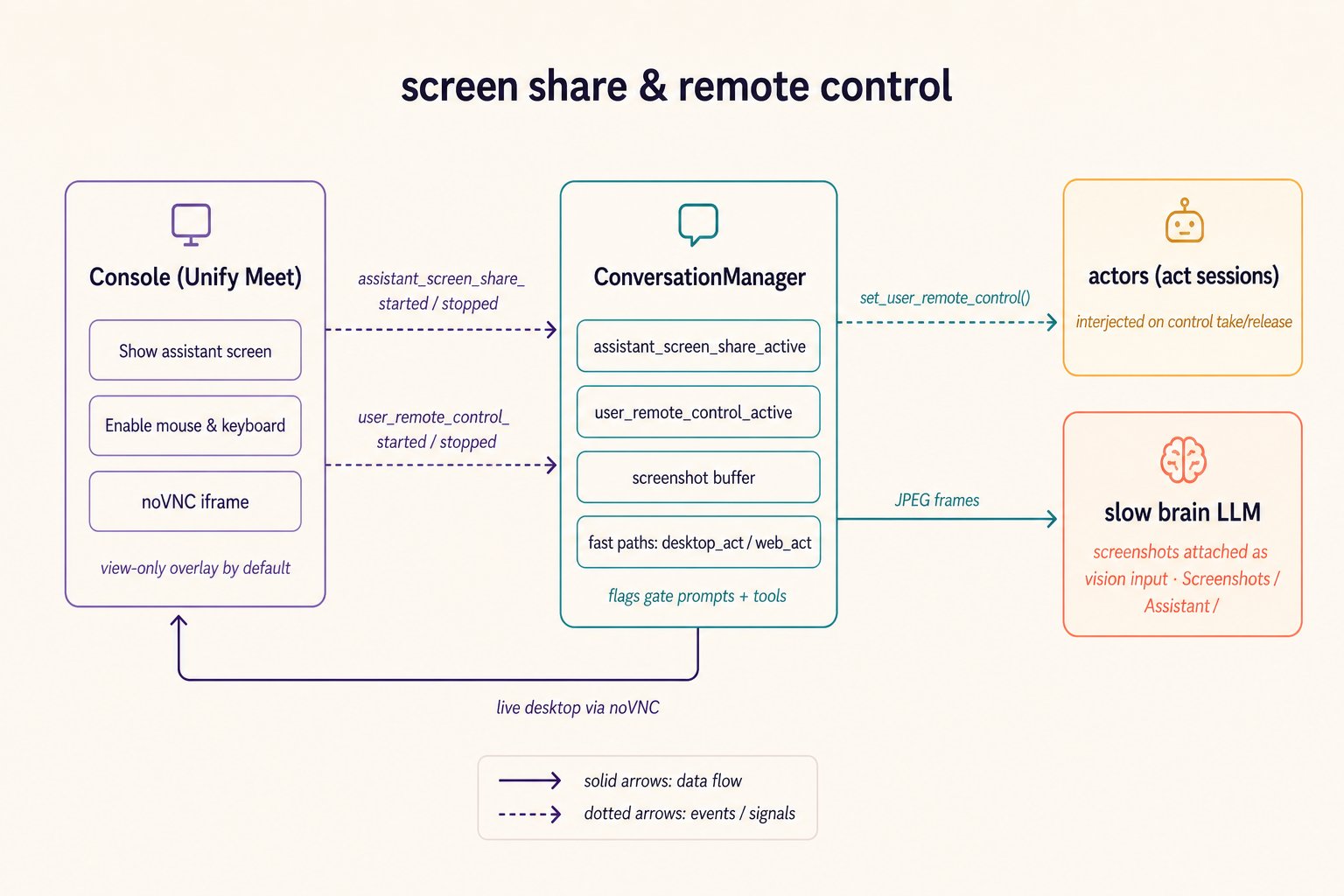 The Console's Meet controls arrive as system events —
`AssistantScreenShareStarted/Stopped`, `UserScreenShareStarted/Stopped`,
`UserWebcamStarted/Stopped`, `UserRemoteControlStarted/Stopped` (all in
[`events.py`](https://github.com/unifyai/unify/blob/main/unify/conversation_manager/events.py)).
The shared handler in
[`event_handlers.py`](https://github.com/unifyai/unify/blob/main/unify/conversation_manager/domains/event_handlers.py)
flips the corresponding ConversationManager flags
(`assistant_screen_share_active`, `user_remote_control_active`, …), pushes
notifications to the slow brain and — during voice calls — guidance to the
fast brain, and on screen-share start eagerly warms the desktop session so
the first screenshot is instant.
Three mechanisms hang off those flags:
* **Fast paths.** `computer_fast_path_eligible` (true iff the assistant's
screen is being shared) exposes the `desktop_act` / `web_act` tools in
[`brain_action_tools.py`](https://github.com/unifyai/unify/blob/main/unify/conversation_manager/domains/brain_action_tools.py).
These deliberately **bypass the actor**: `_invoke_fast_path_action`
calls the primitives directly in a background task, registers a
minimal `_DesktopActionHandle` in the in-flight action set, silently
interjects any running `act` sessions with what happened, and returns
`{"status": "acting"}` immediately. One visible interaction per call —
the constraint that keeps them snappy — is enforced by prompt contract.
* **Remote control arbitration.** `ComputerPrimitives.
set_user_remote_control(active, context)` broadcasts interjections into
every registered actor queue, so running plans learn the user has the
mouse (and later, that they released it). During user control,
assistant-frame capture switches to cached frames
(`cached=not user_remote_control_active` in
[`medium_scripts/call.py`](https://github.com/unifyai/unify/blob/main/unify/conversation_manager/medium_scripts/call.py));
on release, a fresh live capture resets the cache.
* **The screenshot pipeline.** While sharing, assistant frames are
captured via `POST /screenshot/latest`, converted to JPEG, and pushed
into `ConversationManager._screenshot_buffer`. On each slow-brain turn
the buffer is drained, frames are written under
`Screenshots/Assistant/` (paths from `generate_screenshot_path()` in
[`cm_types/screenshot.py`](https://github.com/unifyai/unify/blob/main/unify/conversation_manager/cm_types/screenshot.py)),
and attached to the LLM request as multimodal image content. Inside
`act`, plans read the same files and reason over them with
`query_llm(prompt, images=[...])` from
[`common/reasoning.py`](https://github.com/unifyai/unify/blob/main/unify/common/reasoning.py).
External meetings reuse the machinery:
[`call_manager.py`](https://github.com/unifyai/unify/blob/main/unify/conversation_manager/domains/call_manager.py)'s
`_start_meet_screenshare` presents the VM's own noVNC page
(`{desktop_url}/desktop/custom.html?password=…`) into a Google Meet or
Teams call via the agent-service's meet routes.
## The actor's view
[`ComputerEnvironment`](https://github.com/unifyai/unify/blob/main/unify/actor/environments/computer.py)
registers the actor-facing tools — the desktop singleton methods, the web
factory, and the user-desktop factory — and contributes the prompt context
that teaches plans the ground rules: desktop is for native apps and
anything already on screen, `web.new_session(visible=True)` is the default
for browser work (`visible=False` for background lookups), screenshots are
interpreted with `query_llm(images=...)` rather than `observe()` for pure
perception, and desktop vs. web-session screenshots live in different
coordinate spaces. Its `capture_state()` hands the steering system a
`{type: "visual", screenshot, url}` snapshot so a paused action can be
inspected mid-flight.
## Tests as specs
The most instructive behavioral specifications, all under
[`tests/`](https://github.com/unifyai/unify/blob/main/tests):
| Test | Pins down |
| ---------------------------------------------------------------- | -------------------------------------------------------------------------------------- |
| `conversation_manager/core/test_infrastructure_readiness.py` | Deferral while `vm_pending` / `sync_pending`, follow-up after `FileSyncComplete` |
| `conversation_manager/core/test_event_handlers.py` | Desktop-ready and meet-interaction event handling, flag flips, screenshot-on-utterance |
| `conversation_manager/actions/test_desktop_fast_path_routing.py` | Fast-path tool availability requires an active screen share |
| `function_manager/primitives/test_remote_control_broadcast.py` | Remote-control interjections reach every actor queue |
| `function_manager/python/test_remote_windows.py` | The Windows staging → bisync → PowerShell → result round trip |
| `flows/test_computer_use_desktop.py` | End-to-end desktop computer use |
## Extending
Three seams are designed for extension: implement a new
**`ComputerBackend`** to swap the automation engine (the mock backend is
the reference for the full contract); add an **`ExecutionSurface` target**
to route shell/Python work to a new machine class; or stand up your own
**agent-service** — anything that speaks the `/start`, `/act`,
`/extract`, `/screenshot`, `/exec` protocol with the dual-auth scheme can
serve a desktop.
The Console's Meet controls arrive as system events —
`AssistantScreenShareStarted/Stopped`, `UserScreenShareStarted/Stopped`,
`UserWebcamStarted/Stopped`, `UserRemoteControlStarted/Stopped` (all in
[`events.py`](https://github.com/unifyai/unify/blob/main/unify/conversation_manager/events.py)).
The shared handler in
[`event_handlers.py`](https://github.com/unifyai/unify/blob/main/unify/conversation_manager/domains/event_handlers.py)
flips the corresponding ConversationManager flags
(`assistant_screen_share_active`, `user_remote_control_active`, …), pushes
notifications to the slow brain and — during voice calls — guidance to the
fast brain, and on screen-share start eagerly warms the desktop session so
the first screenshot is instant.
Three mechanisms hang off those flags:
* **Fast paths.** `computer_fast_path_eligible` (true iff the assistant's
screen is being shared) exposes the `desktop_act` / `web_act` tools in
[`brain_action_tools.py`](https://github.com/unifyai/unify/blob/main/unify/conversation_manager/domains/brain_action_tools.py).
These deliberately **bypass the actor**: `_invoke_fast_path_action`
calls the primitives directly in a background task, registers a
minimal `_DesktopActionHandle` in the in-flight action set, silently
interjects any running `act` sessions with what happened, and returns
`{"status": "acting"}` immediately. One visible interaction per call —
the constraint that keeps them snappy — is enforced by prompt contract.
* **Remote control arbitration.** `ComputerPrimitives.
set_user_remote_control(active, context)` broadcasts interjections into
every registered actor queue, so running plans learn the user has the
mouse (and later, that they released it). During user control,
assistant-frame capture switches to cached frames
(`cached=not user_remote_control_active` in
[`medium_scripts/call.py`](https://github.com/unifyai/unify/blob/main/unify/conversation_manager/medium_scripts/call.py));
on release, a fresh live capture resets the cache.
* **The screenshot pipeline.** While sharing, assistant frames are
captured via `POST /screenshot/latest`, converted to JPEG, and pushed
into `ConversationManager._screenshot_buffer`. On each slow-brain turn
the buffer is drained, frames are written under
`Screenshots/Assistant/` (paths from `generate_screenshot_path()` in
[`cm_types/screenshot.py`](https://github.com/unifyai/unify/blob/main/unify/conversation_manager/cm_types/screenshot.py)),
and attached to the LLM request as multimodal image content. Inside
`act`, plans read the same files and reason over them with
`query_llm(prompt, images=[...])` from
[`common/reasoning.py`](https://github.com/unifyai/unify/blob/main/unify/common/reasoning.py).
External meetings reuse the machinery:
[`call_manager.py`](https://github.com/unifyai/unify/blob/main/unify/conversation_manager/domains/call_manager.py)'s
`_start_meet_screenshare` presents the VM's own noVNC page
(`{desktop_url}/desktop/custom.html?password=…`) into a Google Meet or
Teams call via the agent-service's meet routes.
## The actor's view
[`ComputerEnvironment`](https://github.com/unifyai/unify/blob/main/unify/actor/environments/computer.py)
registers the actor-facing tools — the desktop singleton methods, the web
factory, and the user-desktop factory — and contributes the prompt context
that teaches plans the ground rules: desktop is for native apps and
anything already on screen, `web.new_session(visible=True)` is the default
for browser work (`visible=False` for background lookups), screenshots are
interpreted with `query_llm(images=...)` rather than `observe()` for pure
perception, and desktop vs. web-session screenshots live in different
coordinate spaces. Its `capture_state()` hands the steering system a
`{type: "visual", screenshot, url}` snapshot so a paused action can be
inspected mid-flight.
## Tests as specs
The most instructive behavioral specifications, all under
[`tests/`](https://github.com/unifyai/unify/blob/main/tests):
| Test | Pins down |
| ---------------------------------------------------------------- | -------------------------------------------------------------------------------------- |
| `conversation_manager/core/test_infrastructure_readiness.py` | Deferral while `vm_pending` / `sync_pending`, follow-up after `FileSyncComplete` |
| `conversation_manager/core/test_event_handlers.py` | Desktop-ready and meet-interaction event handling, flag flips, screenshot-on-utterance |
| `conversation_manager/actions/test_desktop_fast_path_routing.py` | Fast-path tool availability requires an active screen share |
| `function_manager/primitives/test_remote_control_broadcast.py` | Remote-control interjections reach every actor queue |
| `function_manager/python/test_remote_windows.py` | The Windows staging → bisync → PowerShell → result round trip |
| `flows/test_computer_use_desktop.py` | End-to-end desktop computer use |
## Extending
Three seams are designed for extension: implement a new
**`ComputerBackend`** to swap the automation engine (the mock backend is
the reference for the full contract); add an **`ExecutionSurface` target**
to route shell/Python work to a new machine class; or stand up your own
**agent-service** — anything that speaks the `/start`, `/act`,
`/extract`, `/screenshot`, `/exec` protocol with the dual-auth scheme can
serve a desktop.